Breaking News
Showing posts with label WhatsApp Tricks. Show all posts

Tuesday, 28 January 2014

How to tag all the friends in comments on facebook / How to Auto Mention Every Friend In Comments on Facebook ???

Welcome Back Guys , Your Jagdeep Gill is back with a new trick "How to tag all the friends in comments on facebook / How to Auto Mention Every Friend In Comments on Facebook ???" 

Well on a facebook post you can't tag your every friend in your post , but isn't it amazing if your every friend is tagged on a post and it will definitely increase the number of likes on your post .

The Requirement for this is Google Chrome , a working internet connection and a facebook account .

So lets start with the tutorial :- 

1) First of all post what you want on facebook , I mean update your status .


2) Now open it in new tab .


3) Right click anywhere on the screen and select "Inspect Element" option .


4) Now a rectangular box will open in front of you .

5) What you have to do is just copy the whole script provided here in the Link and paste it inside the Console Tab and press Enter.

Download Script 


Now Copy This Code and Paste it in the Console box , Just as shown in the image below :-


6) Now Hit Enter and see the magic . 


Enjoy !!!
Read more ...

Thursday, 23 January 2014

How to hide last seen on WhatsApp??? (For Android and iOS)

Hello Guys , today I'm going to show you something new -  How to hide last seen on WhatsApp??? As you know "last seen" is a feature by WhatsApp which enables it's users to know that when their friend was last online on WhatsApp , also this feature of WhatsApp help your friends to know that you have read their message or not. So if you want to hide last seen of your WhatsApp then this post will help you to do this.


  • For Android devices :-


We have two methods to hide "last seen" from WhatsApp .
1)Manual Method .

  • 2)Application Method .


  • Lets start with the Manual Method


First of all we have to understand how this feature works. Okay Let me tell you , whenever you open WhatsApp it updates your last online time to its database using your internet connection. So if you will disable your internet connection before opening WhatsApp then it can not update your last seen time to its database. So simple manual solution for this is that disable your internet connection before opening WhatsApp.


  •  Application Method


 There are many application available on Google Play Store to do that which you did manually. But I am going to share one of them because I tested it first and it is working fine. So here are steps , just read and follow them carefully.

1)First Install WhatsApp No Last Seen from Google Play Store .


2)Now just configure this app using tutorial given in the app.

3)Now you have to do nothing , now its app headache to hide your last seen from your friends. 


  • Working of this App


This app will recieve your WhatsApp and will give you the ability to reply the message. When you open WhatsApp to reply, it will automatically disconnect from internet and when you will come back to home screen it will automatically connect you to the internet.


  • For iOS devices :-

Selecting the Settings >> Chat Settings >> Advanced and then toggling the Last Seen Timestamp ‘Off’ allows users to have at least a little bit of mystery surrounding their chat status.


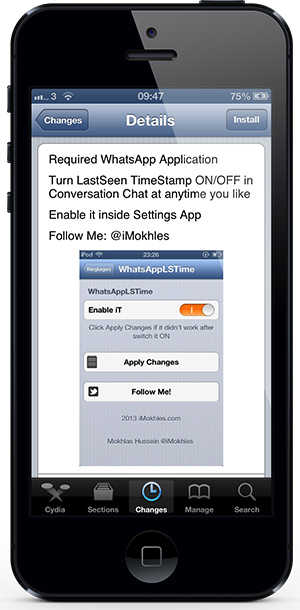
If removing the last seen timestamp from all chat conversations is what you’re after, then one of the latest tweaks to land on the jailbroken Cydia store definitely fulfills that role as well as earning itself a nomination for having one of the longest and literal names that we have seen. The WhatsApp LSeen TimeStamp package is one of those self explanatory installations where the developer has pretty much given the functionality away in the title, even if it doesn’t exactly roll off the tongue.


You are all done EnjoY .
Read more ...

Thursday, 9 January 2014

How To Enable Comment Reply Option on your Facebook Profile ???

Facebook Just Introduced Reply option for New - Zealand Facebook Users =D You Can Also use get it with proxy .
Requirements :- Google Chrome , an internet connection .

So lets start with the trick :-
1) Open Google Chrome .

2) Open touch.facebook.com and login through your facebook ID .

3) Now Right click anywhere and click on inspect element .

4) Now Click the Setting [gear] .

5) Now " Click Overrides "     
    Check/Enable “Override Geolocation”.
    Type/Copy those number in the boxes : Lat = -41.289996 Lon = 174.781555

    Close setting window and Keep the inspect element window open .


6) Now Click " Check in " .

7) Don't click post , just open a new tab and open www.facebook.com and now you can make a post :-) .

EnJoY :-)

If you really liked this , then please take 3 seconds and share it with your friends .

Read more ...

Wednesday, 1 January 2014

How to use WhatsApp free for another year ?


Hello friends , As most of you use a common messenger called WhatsApp , and as you all know you can use it free for 1 year , and after that you will have to pay Rs 55/- .
Don't you want to use it for free???
The answer is yes , but how ??? So today I will tell you "How to use WhatsApp free for another year ?"
The requirement is only an Android SmartPhone with Gmail installed .
It's a very simple trick , so lets start :-
1)First of all delete your old gmail account and create a new one on your SmartPhone.
2)Then Download WhatsApp from Google Play Store .
3)After installing , then check you got WhatsApp free for another 1 year , isn't it amazing ?
It is tested by me , and if you got any problem then write in the comments box.
 NOTE :- IT IS ONLY FOR ANDROID ENABLED SMARTPHONES NOT FOR IOS OR WINDOWS PHONE.              

Hey guys if you really liked this then please take 3 seconds and share it with your friends .
Read more ...
All Rights Reserved . Designed and Published By Hacking Frontier